Osmolog Add to your browser

You pick up a language—almost by osmosis.

See how much language
immersion you actually do.

Osmolog tracks supported videos automatically and keeps your reading, games and study sessions in one dashboard. See where your language-learning time goes.

  • Follows video playback
  • Active and passive kept apart
  • Time by language, activity and source

Works on YouTube, Netflix, Twitch and Crunchyroll. Free. No account required. Local by default. No ads.

Osmolog · OverviewViewing: Japanese ▾
Total tracked 54h 00m +18% vs previous 30 days
Daily average 1h 48m across 30 calendar days
Days immersed 24/30 2h 15m per immersed day
Average session 24m across 135 sessions

Immersion over time

Active and passive minutes, last 30 days

Click a line or a label to isolate it.

How you immerse

  • Watching33h 30m
  • Listening12h 50m
  • Reading5h 20m
  • Vocabulary2h 20m

Your attention mix

Active
37h 48m70%
Passive
16h 12m30%

Where it came from

  • YouTube20h 40m
  • Netflix13h 20m
  • Twitch9h 20m
  • Manual7h 40m
  • YouTube Music3h 00m

Built by a language learner and gamer. Number go up, brain happy. That's where it started.

What can I track?

Videos, games, reading. One place for the time.

Some activities follow playback automatically. Others need a connection or a timer you start yourself.

Automatic · browser

YouTube, Netflix, Twitch and Crunchyroll

Count supported, audible playback, with focused viewing and background listening shown separately. Pausing or muting stops counting.

Language and setup

Check the language in the overlay. Player language information takes priority; if it is unclear, choose the language yourself. Translated captions are not proof of the spoken language.

One-time site setup

Other video sites

Add an HTML-video website, grant permission for that site and choose its language. Some embedded players need permission for their own host too.

Supported players

Compatibility varies. The extension labels other adapters Beta or Experimental. Prime Video currently needs the manual timer.

Manual timer or saved entry

Books, games and conversation

Start a timer or add a past session for reading, gaming, speaking, writing, vocabulary, watching or listening. Console games, lessons and mobile activities belong here too.

Reading on websites

For supported article websites, enable the site and press the reading control. Reading never starts automatically and pauses when the page loses focus.

Desktop connection

Anki, MPV and Manatan

Bring Anki review statistics into your dashboard, or track local MPV and Manatan video with the Windows Companion.

Connection requirements

Anki must be open; this does not track Anki mobile apps automatically. The separate Windows Companion connects MPV/mpv.net and native Manatan video playback. It requires Windows 10/11 x64, pairing and player setup.

2.2.0 preview · Windows Companion

Local Steam games

Opt in to Steam tracking and set each game's language. The Companion tracks running games with focus and idle checks, and lets you pause or exclude a game.

Gaming limits

It cannot reliably detect every in-game pause menu. Steam Deck, console games and historical Steam playtime imports are not covered.

2.2.0 preview · phone timer beta

Record away from your computer

Start a manual watching timer or enter a completed session on your phone, then collect it in the extension later. Your computer can be off.

Phone requirements

Requires internet and the same confirmed Osmolog account. It does not monitor other apps on your phone.

Desktop Chrome and Edge. Features marked 2.2.0 preview belong to the next extension update; check your installed version. Music and podcast adapters have their own Beta or Experimental labels in Site rules.

Why it exists

I know myself too well to press start.

I watch in Japanese, English and Swedish, sometimes in the same evening. Every tracker I tried wanted me to choose a language and start a stopwatch first. I know myself too well. I was never going to keep that up.

So I built the tracker I wanted: it starts and stops itself, works out which language is playing, and separates the time I am watching from the time something is merely playing while I cook. Then it shows me where those hours actually went.

It was only meant to be for me. It grew into a polished one-person project, so I decided to share it for free.

— Melis

How it works
  1. You start a video.

    YouTube, Netflix, Twitch or Crunchyroll. Just press play. Osmolog is already running in the background.

  2. It works out the language.

    From the audio track, the captions and the player data. If it can't tell, it asks you instead of guessing, and remembers your answer for that channel or series, so it's not asking again every time you open your favourite creator.

  3. You come back to proof.

    Review time by language, source and activity, split into active and passive. If a language was detected incorrectly, correct it in the overlay or history.

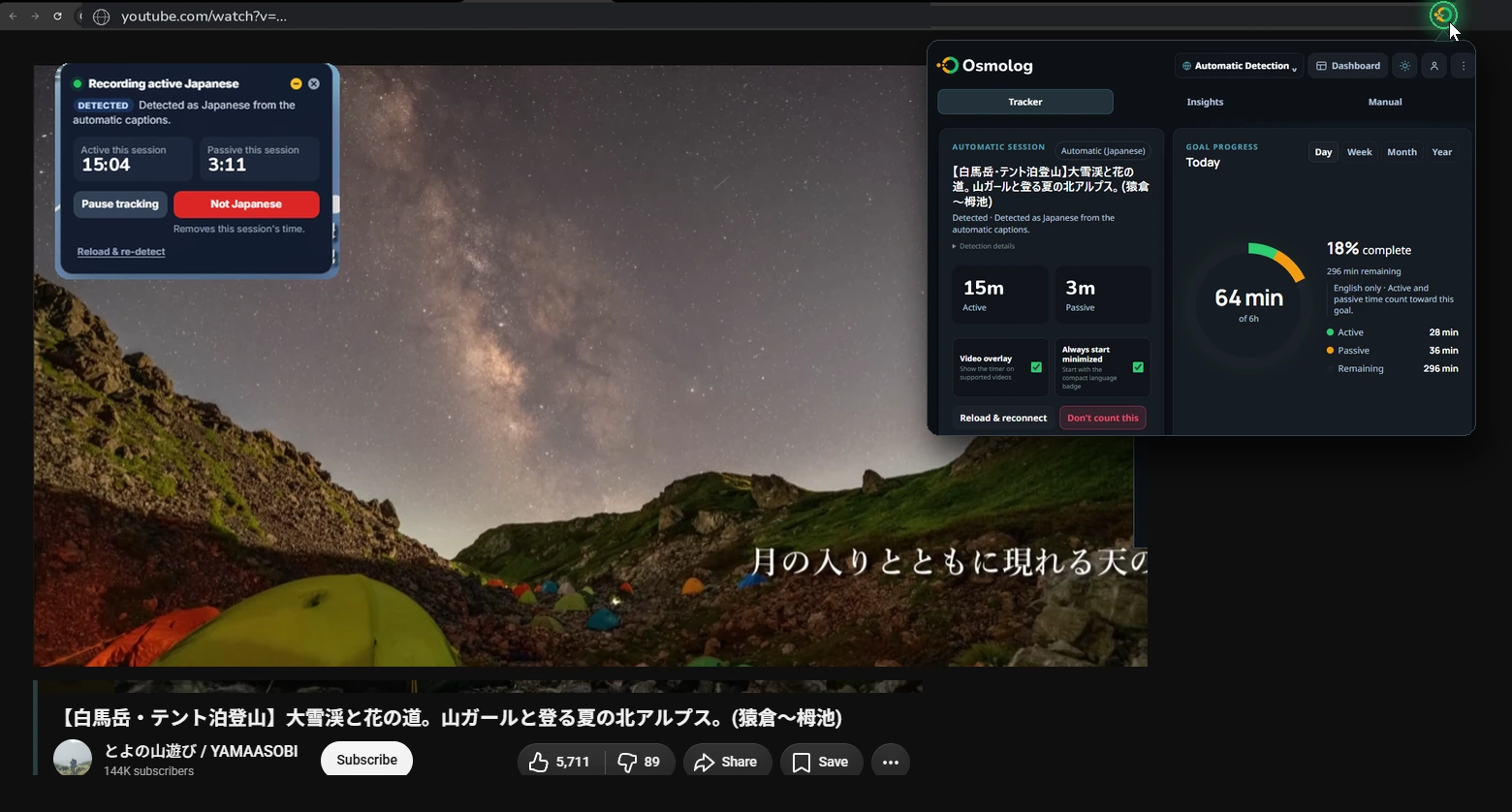
A Japanese YouTube video playing with the Osmolog badge counting 15:04 active and 3:11 passive, and the Osmolog toolbar popup open showing the detected session and today's goal
Click the toolbar icon for the session and today's progress. The badge on the video shows what is being counted right now: pause it, correct it, or dismiss it.
FAQ

Questions people usually have.

What it tracks, and how

Where it works

YouTube, Netflix, Twitch and Crunchyroll, on both live streams and VODs where available. Playback starts the timer; muting or pausing stops it. Twitch is here because it's where I actually watch: Japanese streamers playing games I already play is the easiest immersion I've found. Anything else stays labelled Beta or Experimental in the extension until I've checked it against that site's current player, because there's no point counting time I can't count correctly.

More than one language

Automatic mode uses the player's language information and your remembered choices. Unclear videos ask for a language; custom sites and manual activities need a choice too. Each session stays assigned to its language, so one install can cover the different languages you study.

Active and passive

Focused foreground viewing counts as active. Eligible audible playback in the background counts as passive. These describe browser focus, not a measurement of your concentration. See the total with active and passive time kept visible as separate parts.

When, not just how much my favourite bit

Time of day, day of week, session length, streaks, a year heatmap and a weekly recap. This is the part I actually use: whether my evenings are focused or just background noise, and which day of the week quietly does the work.

YouTube Music, honestly undecided

Music plays through a video element, so the extension can see it and does count it: active if the tab is in front, passive if it's behind. I've deliberately not folded it in with everything else. Eight hours of background music is not eight hours of immersion, and a number that says otherwise is worse than no number. So it sits in its own source category where you can see it, judge it, and turn it off if you'd rather it didn't count. If you have a strong view on how this should work, tell me. I'm genuinely undecided.

Everything that's not video

A persistent timer and backdated entries cover reading, gaming, tutoring, speaking, writing and other study. Manual time counts towards your own totals. Private groups can choose whether manual entries count in their comparisons.

Where your data lives

Local by default

Without Pro full backup, detailed history stays in your browser. Local tracking needs no account, and Osmolog never sends URLs, subtitles, searches or page text to its own services.

If you enable Pro full backup

After you review the disclosure and sign in, Osmolog can store your complete tracker history and settings in your private account backup for recovery. That includes session titles and timing, but excludes URLs, searches, subtitles, page text and artwork URLs.

Usage analytics, if you want to help

There's a switch in Settings → Privacy & data marked Send anonymous usage data. It's off until you turn it on. It sends language, general platform, active/passive duration, broad activity type, date and extension version, without titles, URLs, searches, subtitles or manual notes. Optional error reporting has separate consent. See the privacy policy for the exact data each feature uses.

This website

osmolog.com counts page views through Cloudflare Web Analytics: which page, roughly which country, and where the visit came from. No cookies, no following you around the web. It's completely separate from the extension and can't see anything inside it. It exists so I can tell whether anyone found the site at all.

No advertising, nothing sold

No advertising SDK, no data broker, no sale. There's nobody to sell it to and I'm not going to build that.

Getting it out again

Export a JSON backup for restoring detailed history, or a CSV of your totals. Basic Chrome Sync carries totals and recent daily aggregates, not a complete session archive. Keep a JSON backup before uninstalling or clearing browser data.

What's coming, and honest answers

Comparing with a friend preview

An optional way to compare momentum with a friend or a small group. Members would see each other's totals and nothing else: never titles, never URLs, never what anyone watched. It's still being built.

Language comparison 2.2.0 preview

The next update includes a comparison view for the languages you track, alongside the individual language dashboards. See how your time is divided without combining every language into one goal.

More platforms

Each service has its own player handling and can change. Supported, Beta and Experimental labels show the current level of support. A service name in the manual timer is just a label; it does not imply automatic integration.

Will it stay free?

Local tracking, statistics and JSON backups are free and do not need an account. Basic Chrome Sync carries totals. Optional full-history account backup and group features have their own availability and account requirements; the extension explains those before you enable them.

Does it work if I don't watch video?

Yes. Supported audio players are tracked automatically. For reading, enable only the article sites you choose and press the in-page reading control; tutoring and speaking use the manual timer. Reading never starts on its own.

I'm learning two languages. Do I need two of anything?

No. One install can track multiple languages. Automatic mode identifies supported videos when it has enough information; check the overlay and choose or correct the language when needed.

Track yours.

Start your next video. Check the language and timer, then see where your time goes.

Add Osmolog to your browser Free. No account. No ads.